What is SEO (Search Engine Optimization)?
SEO is a strategy used by website owners in order to drive more traffic to their sites by ranking higher in the search engines.
Why is SEO important?
Most people reach certain websites by searching for specific terms on search engines. Google and other search engines use advanced algorithms to read, understand and rank pages appropriately in the search results. Algorithms are far from perfect though, as they still need your help to understand what the content is about. Optimizing the content on your site is super important or else the search engines won’t know how to rank it. When a user searches for specific topics that you have written about, your website may not appear in the search results without proper optimization and you will miss out on valuable, money-making traffic.
WordPress is now the most popular content management system (CMS) in the world. That being said, WordPress has the best options and tools for Search Engine Optimization.
Visibility
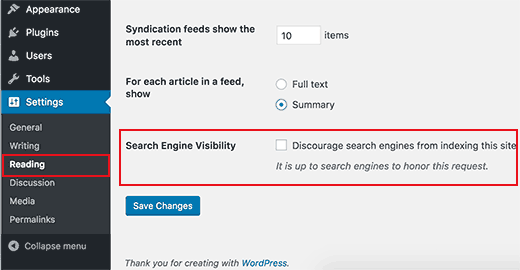
One of the first things you want to check on your WordPress site are the visibility settings. WordPress allows you to hide your website from the search engines. This option is here so that you can build your site and get it ready before you share it with the rest of the world. Sometimes people forget to turn this option off or they accidentally leave this box checked.
To find this function, log into the admin area of your site, click on Settings > Reading and from there you will be able to access this area and uncheck this box.. Don’t forget to save your changes before exiting.
WWW vs Non-WWW Sites
If you are just getting your website started, you will need to choose whether you want to use a www site (http://www.example.com) or a non-www (http://example.com) in your main URL.
The search engines will consider these to be two different sites, so you need to choose what you want to use and stick with that decision in the long run. You may set this up under the Settings > General area. Add the website URL you want to use in both the ‘WordPress Address’ (URL) and the ‘Site Address’ (URL) areas.

Yoast SEO
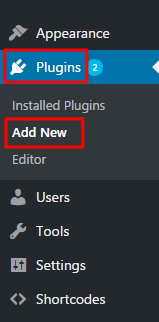
There are many SEO plugins out there to help you optimize your pages and posts, but we have found that Yoast SEO is the best! The next thing you will want to do is to install Yoast SEO and activate it. You may either go to Yoast’s website to download the plugin or you may go to Plugins > Add New, search for ‘Yoast SEO’ and install it from there. We will cover how to use this in more detail with pages and posts below.
Add Your Sitemap
An XML sitemap is a specifically formatted file that lists every page of your website. This file tells the search engines what all is on your site and helps the search engines see every page so they can start ranking those pages appropriately. The Yoast SEO plugin will automatically create an XML sitemap for you.

Pages and Blog Posts
After installing the Yoast SEO plugin you are ready to begin optimizing your pages and posts.
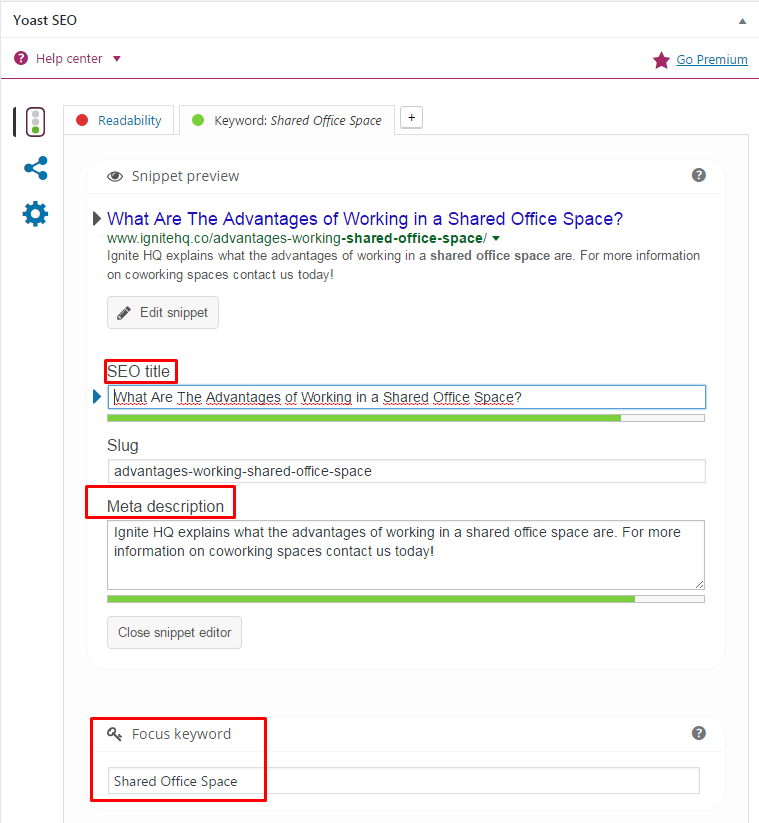
See the image below how we put in the unique SEO Title, meta description as well as the focus keyword. You want to be sure to have your focus keyword in your page or post page title, SEO title, meta description as well as throughout the content.
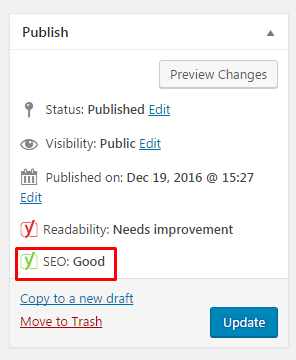
If you have optimized the page or post properly you should have a green color that your SEO is ‘good’.
Use SEO Friendly URL Structures
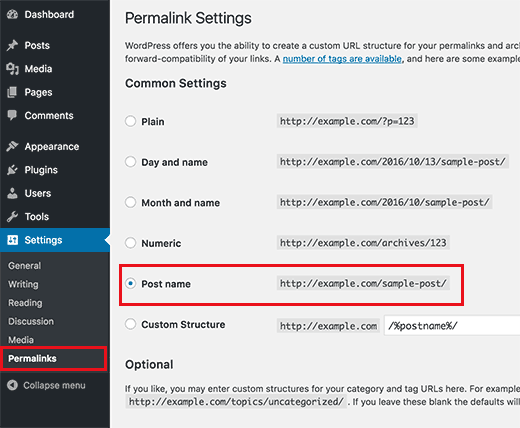
You also want to be sure that your URLs are SEO-friendly. You can go to Settings > Permalinks and select the ‘Post name’ option as seen below. This will give you much cleaner URLs for your posts. Be careful with this though, as you will need to redirect old URLs to the new URLs if you already have posts that have been published before you change this area. You may need to hire an SEO professional to help with these redirects if you are not familiar with how this works.
These are just the basics of getting your website more SEO-friendly so that the search engines can better understand who you are, what you do and how to direct traffic to your site better.
Should you have any additional questions or need more in-depth help with your SEO in addition to social media marketing and much more, please contact us here at Sideways8. We look forward to serving you!